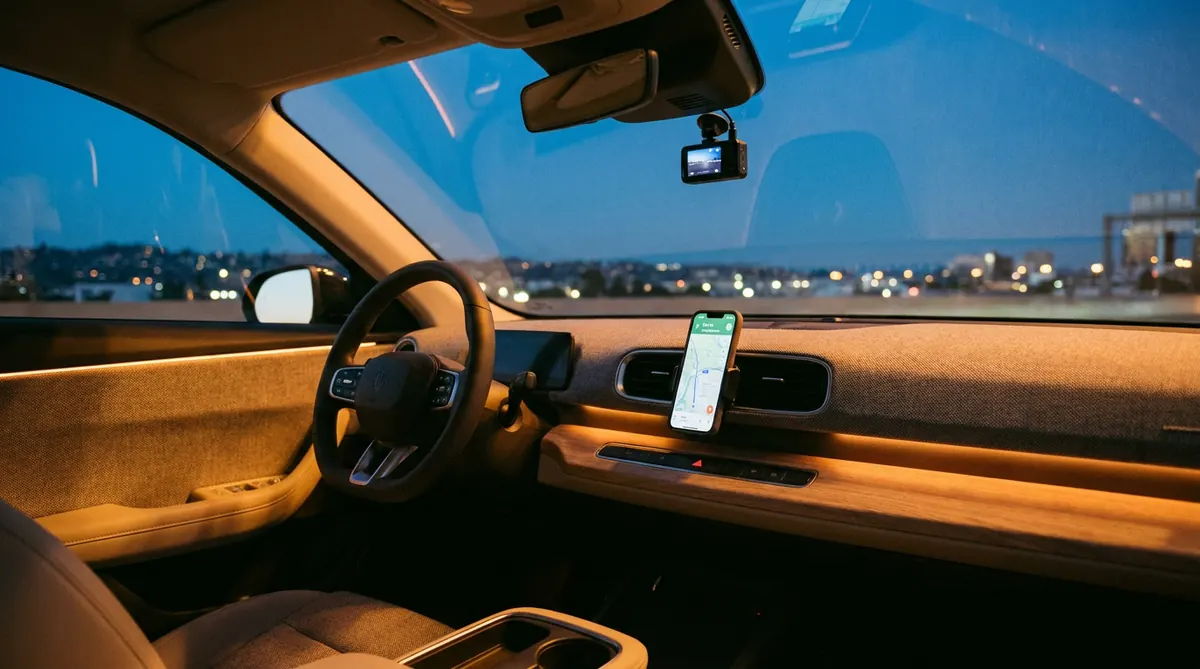
Best Phone Mounts for EVs - Hands-Free
Teslas and many EVs don't come with a phone mount — the big center screen handles navigation, but you're still stuck without a spot for your own phone for gig work, glancing at messages, or apps the car doesn't run. The right mount for an EV clips to the screen edge, dash, or (where present) a vent, holds steady over expansion-joint bumps, and ideally charges via MagSafe/Qi2 so you're not fumbling a cable. The one gotcha: the 2024–2026 refreshes (Model 3 Highland, Model Y Juniper) changed the screen and dash, so buy a mount that lists your exact model. Four solid options on Amazon now.
Phone mount picks at a glance
| Pick | Type | Mount location | Charging | Fit | Street price |
|---|---|---|---|---|---|
| iOttie iTap 3 Magnetic Best Overall | Magnetic (metal plate) | Dash or windshield | None (add wireless separately) | Universal | ~$30 |
| ESR HaloLock Qi2 Best MagSafe (with charging) | MagSafe / Qi2 magnetic | Tesla screen edge or dash | Qi2 wireless up to 15W | Tesla + universal | ~$45-60 |
| Spigen OneTap MagFit Best Budget MagSafe | MagSafe magnetic | Dash / vent | None | Universal MagSafe | ~$17 |
| Spigen TapLock (screen-side) Best for the Tesla Screen | Magnetic, screen-mounted | Tesla display edge | None | Model 3/Y (check Highland/Juniper) | ~$25 |
What to look for in an EV phone mount
- Compatibility with your EV's screen, USB ports and 12V/accessory power
- Video resolution and night performance (for cameras), or hold strength (for mounts)
- Whether it draws standby power and how that affects your battery
- Ease of install — plug-and-play vs hardwired
- App quality, storage/SD support, and firmware updates
Our top EV phone mount picks for 2026
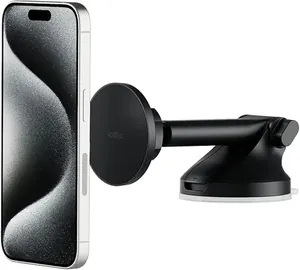
iOttie iTap 3 Magnetic — Best Overall
- Type: Magnetic (metal plate)
- Mount location: Dash or windshield
- Charging: None (add wireless separately)
- Fit: Universal
- Street price: ~$30
The iTap 3 is the do-everything pick: strong N52 rare-earth magnets grab your phone (with the included metal plate or a compatible case) and don't let go over rough pavement, and the washable suction base sticks to the dash or windshield and re-sticks for years. It's universal, so it works in any EV — not just a Tesla — and the magnetic grab-and-go is genuinely one-handed. No built-in charging, but it's the most reliable hold here for the money.
Best for: Anyone who wants the strongest, simplest magnetic hold in any EV.
Pros:
- ✓ Very strong N52 magnetic hold
- ✓ Washable, reusable suction base
- ✓ Universal — works in any EV
- ✓ One-handed grab-and-go
Cons:
- ✗ No built-in charging
- ✗ Needs a metal plate or compatible case
- ✗ Suction mount, not screen-integrated
ESR HaloLock Qi2 — Best MagSafe (with charging)
- Type: MagSafe / Qi2 magnetic
- Mount location: Tesla screen edge or dash
- Charging: Qi2 wireless up to 15W
- Fit: Tesla + universal
- Street price: ~$45-60
If you have a MagSafe iPhone, the HaloLock Qi2 is the sweet spot: a Qi2-certified magnetic mount that snaps your phone to the side of the Tesla touchscreen (or the dash) and wirelessly charges at up to 15W — full MagSafe speed. The magnet alignment is strong enough to hold through bumps, and the screen-edge position keeps the phone in your sightline without blocking the display. One clean accessory replaces a mount and a charging cable.
Best for: MagSafe iPhone owners who want the phone charging while it's mounted.
Pros:
- ✓ Qi2-certified 15W wireless charging
- ✓ Strong MagSafe-style magnetic hold
- ✓ Mounts on the Tesla screen edge or dash
- ✓ Removes a separate charging cable
Cons:
- ✗ Needs a MagSafe/Qi2 phone (or a stick-on ring)
- ✗ Pricier than plain mounts
- ✗ Draws from a USB port for power
Spigen OneTap MagFit — Best Budget MagSafe
- Type: MagSafe magnetic
- Mount location: Dash / vent
- Charging: None
- Fit: Universal MagSafe
- Street price: ~$17
The cheapest MagSafe mount worth owning. Spigen's OneTap MagFit uses a properly aligned magnet array that actually holds an iPhone (in a MagSafe case) without the slow slide cheap mounts suffer from. No charging, but if you already charge elsewhere and just want a rock-solid, low-profile magnetic dock for under $20, it's hard to beat. A great first mount or a spare for a second car.
Best for: MagSafe users who want a dependable magnetic mount for the lowest price.
Pros:
- ✓ Properly aligned MagSafe magnets
- ✓ Holds securely without sliding
- ✓ Very affordable
- ✓ Low-profile design
Cons:
- ✗ No wireless charging
- ✗ Needs a MagSafe phone/case
- ✗ Fewer positioning options
Spigen TapLock (screen-side) — Best for the Tesla Screen
- Type: Magnetic, screen-mounted
- Mount location: Tesla display edge
- Charging: None
- Fit: Model 3/Y (check Highland/Juniper)
- Street price: ~$25
Some owners want the phone right next to the Tesla display, not on the dash or a vent — the TapLock clamps discreetly onto the edge of the touchscreen and puts your phone inches from the nav. It's Tesla-specific and keeps everything in one sightline, which is great for rideshare or navigation-heavy driving. Just confirm the version matches your car: the Highland/Juniper screens differ from the older ones.
Best for: Tesla owners who want the phone mounted right at the screen edge.
Pros:
- ✓ Phone sits right by the Tesla display
- ✓ Discreet screen-edge clamp
- ✓ Keeps nav and phone in one sightline
- ✓ Solid magnetic hold
Cons:
- ✗ Tesla-specific — verify model/year
- ✗ Can crowd the screen for some
- ✗ No charging
Where to mount in an EV
EVs give you three spots. The touchscreen edge is closest to the nav and cleanest on a Tesla; the dash is universal and works with suction mounts like the iOttie; vents work where present, but many EVs have hidden or minimal vents, so screen and dash mounts are safer bets. Pick based on where your eyes naturally go and whether your car even has a usable vent.
MagSafe / Qi2 and charging
A magnetic MagSafe or Qi2 mount is the nicest daily experience — snap on, charge, grab and go. Qi2-certified mounts (like the HaloLock) deliver the full 15W; a non-MagSafe phone needs a stick-on metal ring. If you don't care about charging, a strong plain magnetic mount is cheaper and just as secure.
Frequently asked questions
Q: Do these fit the new Model 3 Highland / Model Y Juniper?
A: Only if the listing says so — the 2024 Highland and 2025 Juniper changed the screen and dash. Screen-edge mounts especially must match your exact model and year.
Q: MagSafe or plain magnetic?
A: MagSafe/Qi2 mounts (ESR, Spigen MagFit) add wireless charging and snap on cleanly if you have a compatible iPhone. Plain magnetic mounts (iOttie) work with any phone using a metal plate and hold just as well.
Q: Will a mount block my EV's sensors or airbags?
A: Dash and screen-edge mounts don't. Avoid covering the passenger airbag area or any driver-assist camera, and keep suction mounts low on the windshield.
Q: Can it charge my phone?
A: Only the Qi2/MagSafe mounts with a charger built in (ESR HaloLock). The others hold only — charge via a separate cable or pad.
Shopping for a specific EV? See accessory picks for the Model Y, Model 3, Cybertruck, or browse all vehicles.